AI topics
The Topics tab uses AI to read responses and group what customers say into themes, with each theme’s sentiment and the quotes that back it up.
The analysis uses AI units. Each plan has a number of units per month, shared across all your spaces. See Plans and limits.
Analyze the responses
The analysis doesn’t run on its own: you choose when and what to analyze.
Choose the selection
In Insights, adjust the period and filters. The analysis uses that same selection.
Open the analysis
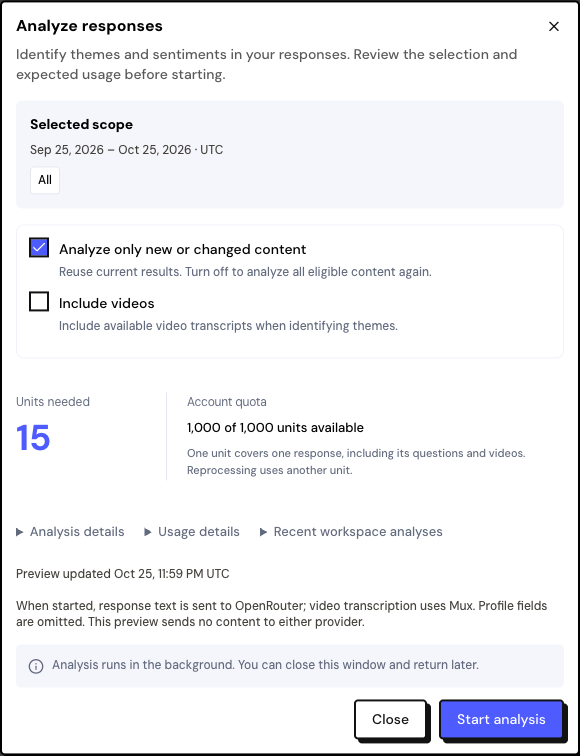
Click Analyze responses at the top of the page.
Check the options
Analyze only new or changed content is on by default and reuses earlier results. Include videos is off by default; turn it on to use the video transcripts.
Check the units and start
The window shows how many units will be used and how many you have. Click Start analysis.
The analysis runs in the background: you can close the window and come back later. Only one analysis runs at a time in each space.
| Situation | Units |
|---|---|
| Analyze a response (with all its questions and videos) | 1 |
| Analyze the same response again | 1 more |
| Reuse a result | 0 |
If the selection needs more units than you have, the remaining responses wait for the quota to renew the following month. To stop, use Cancel analysis; what has already been analyzed stays saved.
Read the topics
- Coverage: how many of the selection’s responses have been analyzed so far and the overall sentiment: Positive, Neutral, Negative or Mixed.
- Topics table: each theme, how many responses mention it and the sentiment.
- Topic details: click a theme to see the responses and the exact quotes. Use Open original response to go to the Inbox.
In the topic’s menu, use Rename topic or Merge topic to combine similar themes. These changes apply to every period in the space.
For now, topic names are generated in English. Quotes stay in the response’s original language. Rename the topics into your language, if you prefer.
In Analysis history you see every analysis in the space, with its progress and saved results.
What is sent to the AI
When you start, the response text and the question titles are sent to the AI provider (OpenRouter). With Include videos, the transcription is done by Mux and also sent. Name, email, scores and other profile data aren’t sent. The preview, before starting, sends nothing.
Frequently asked questions
”No identifiable topics in this selection” appears.
The responses were too short to identify themes. Widen the period or include the videos.
Do topics appear in the Inbox?
No. They stay in the Topics tab and in the analysis history.
Do I need to analyze again after editing a response?
Changed responses appear as out of date. A new analysis with Analyze only new or changed content processes only those.