Import people from a CSV
To invite your customers through a campaign, they need to be in People. If you already have the list in a spreadsheet, import it all at once.
This article is about importing contacts. To import testimonials, use Import, in the Collect group.
Prepare the file
Use a UTF-8 CSV, separated by commas or semicolons, up to 5 MB and 10,000 contacts. Click Download example CSV to get the template.
| Column | Field |
|---|---|
email | Email (required). |
name | Name. If left empty, the email is used. |
company | Company. |
tagline | Job title. |
website | Website, starting with http or https. |
granted | Contact permission: sim, yes, true or 1 for authorized. |
Columns in Portuguese (nome, empresa, cargo, site) are also recognized. Tags and avatars aren’t imported; assign tags in People afterward.
Import
Upload the file
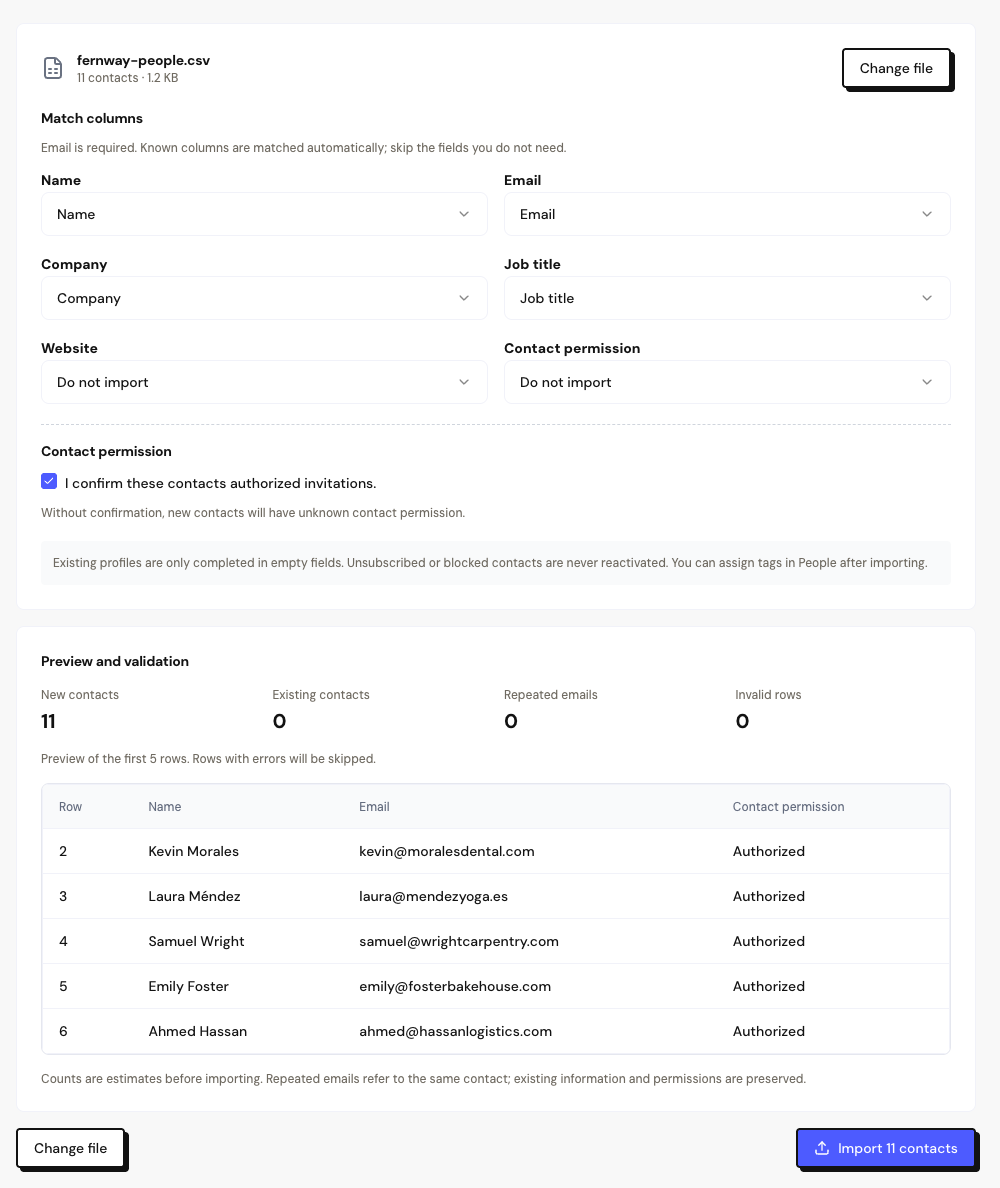
In People, click Import CSV and drag the file or use Select file.
Map the columns
Check which column fills each field. The email column is required. Use Do not import to ignore a column.
Confirm the permission
If these contacts authorized receiving invitations, check I confirm these contacts authorized invitations.
Review and import
Check the preview and click Import contacts.
How the permission is set
A new contact comes in as Authorized when you check the confirmation and:
- the file has no
grantedcolumn, or - the
grantedcolumn for that row says yes.
Without the confirmation, new contacts come in with Unknown permission.
An import never changes the permission of people who already exist. Unsubscribed or blocked contacts are never reactivated by an import.
Preview and result
A contact that already exists (same email) only gets the fields that were empty. The name is never replaced. Rows with problems appear under Rows with problems, with Download error report.
If you close the page halfway through, resume it in Recent imports › Resume import.
Frequently asked questions
”Invalid CSV” appears.
Save the file in UTF-8 and check the quotes and columns. The example CSV shows the right format.
Is there a limit on people in the plan?
There’s no limit on people. The limit is 10,000 contacts per file.
I imported without confirming the permission. What now?
Importing the same file again doesn’t change people who already exist. Update the permission person by person in the profile, with the reason.