Embed the form on your website
Besides the link, the form can appear inside your website. You choose between showing it in the middle of a page (inline) or in a window on top of the page (modal).
Inline or modal?
Get the code
Open sharing
In the form editor, click the share icon. Or, in the Forms list, use the ⋮ menu › Share.
Choose the format
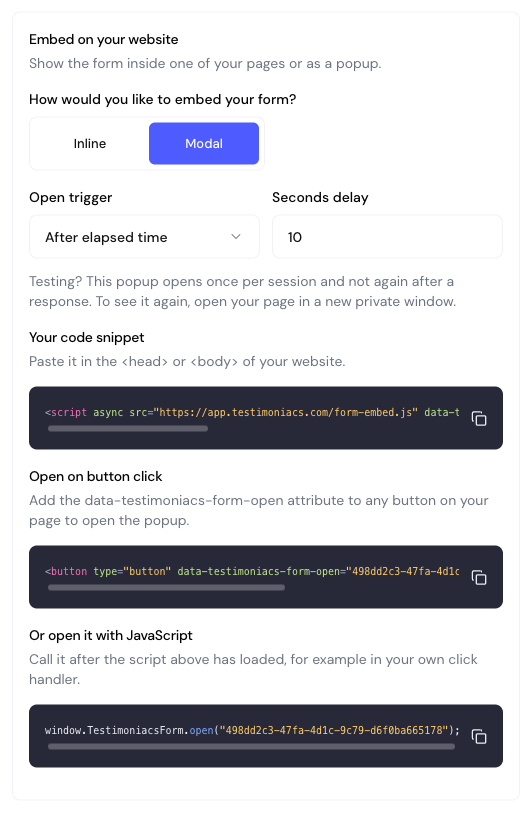
Under Embed on your website, choose Inline or Modal.
Copy and paste
Click Copy code snippet and paste it into your website’s HTML.
Inline
Paste the code where the form should appear. The app generates the code with your form’s ID; the example below uses YOUR_FORM_ID.
<script async src="https://app.testimoniacs.com/form-embed.js"></script>
<div data-testimoniacs-form="YOUR_FORM_ID"></div>
Modal
First choose the Open trigger:
| Trigger | When the popup opens |
|---|---|
| On button click | When the visitor clicks a button on your page. This is the default. |
| After elapsed time | After the Seconds delay (default: 10). |
| After scrolling | When the visitor scrolls the % of page scrolled (default: 60%). |
Then copy the snippets. The first one goes in the <head> or the <body>; the other two are ways to open the popup:
Script
<script async src="https://app.testimoniacs.com/form-embed.js" data-testimoniacs-popup="YOUR_FORM_ID" data-trigger="button"></script>With the time or scroll triggers, the app replaces data-trigger="button" with data-trigger="time" data-delay="10" or data-trigger="scroll" data-scroll="60". Any element with data-testimoniacs-form-open opens the popup. The popup closes with ✕ or the Esc key.
The After elapsed time and After scrolling triggers open the popup only once per browser session, and no longer open for people who have already responded. To test again, open your page in a new incognito window.
Frequently asked questions
Does it work on WordPress, Webflow, Wix and others?
Yes, on any website that accepts custom HTML. Use your platform’s HTML or embed code block.
Does the embedded form use my custom domain?
No. The code always loads from the app’s domain (app.testimoniacs.com). The custom domain applies to the form link.
Can I see where responses came from?
Yes. In Insights, the form sessions card splits visits by source: link, inline embed or modal embed.