Subscription: change plan and cancel
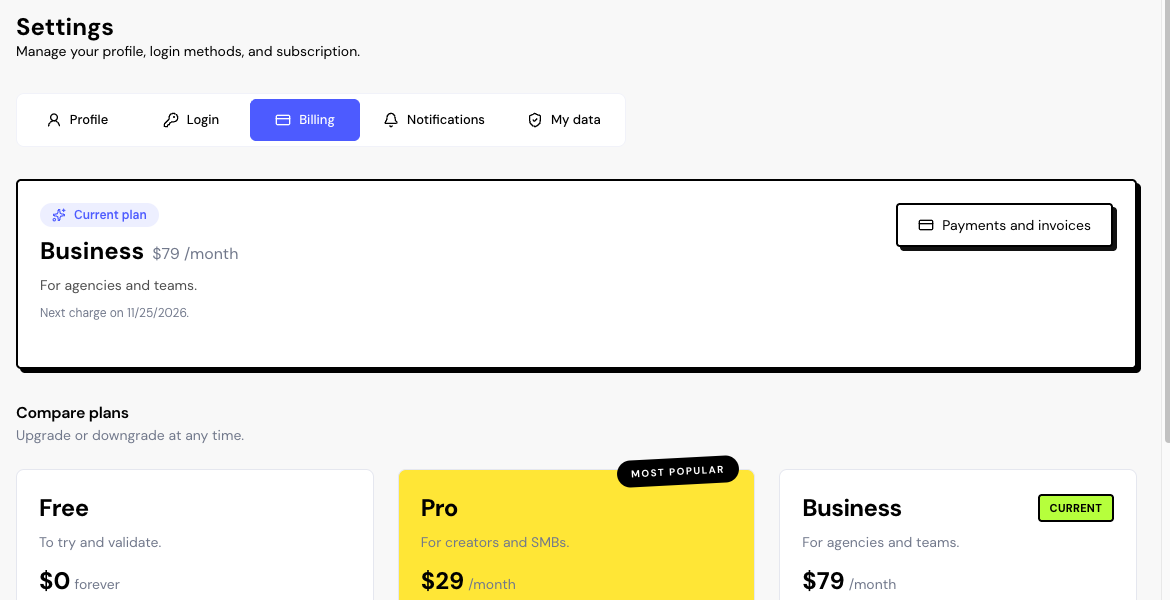
Your subscription is in Settings › Billing, in your account menu, at the bottom of the sidebar. Only the account Owner subscribes and pays; invited members use the Owner’s plan.
The Billing page
- At the top: the current plan, the price and, on paid plans, the next charge or the scheduled change.
- Compare plans: the three plans, with a button for each possible change.
- Payments and invoices and Open billing portal: open the Stripe portal, where your invoices and card are.
Change plan
First subscription
Click Upgrade to Pro or Business. Stripe checkout opens with your email filled in. When you come back, the app confirms the payment within a few seconds.
Cancel
On the Free card, click Cancel at period end. You stay on the paid plan until the end of the period and then go back to Free. There are no prorated refunds.
Cancellation is scheduled with one click, with no confirmation window. If you clicked by mistake, use Keep current plan.
Keep current plan undoes a scheduled cancellation or downgrade, as long as the period hasn’t ended.
Payment failed
If a charge fails, you get the Payment failed notification, in the app and by email. The plan stays active while Stripe tries to charge again. Update your card in Payments and invoices so you don’t lose the plan.
Frequently asked questions
Can I pay yearly?
No. Plans are monthly only.
I have a coupon. Where do I use it?
In Stripe checkout, when you first subscribe.
I canceled. Do I lose my data?
No. You go back to the Free plan and nothing is deleted. See what changes in What happens when you reach a limit.