Approve and highlight testimonials
Every testimonial goes through the Inbox before it appears in public. You decide what gets published by approving or highlighting each one.
A testimonial’s statuses
| Status | Shown in public? | When to use it |
|---|---|---|
| Pending | No. | The status of every new testimonial, unless the form approves it automatically. |
| Approved | Yes: Walls, Widgets, iFrame and the public page. | Testimonials you want to show. |
| Highlight | Yes, like an approved one. | Your best ones. They appear at the top of the Wall when you don’t choose the highlighted cards. |
NPS responses don’t go through approval and don’t appear on Walls. They go straight into the metrics.
Approve, highlight or undo
Open the testimonial’s menu
In the Inbox, on the Testimonials tab, click the card’s ⋮ menu. On a pending testimonial, you can also click Approve right on the card.
Choose the action
Use Approve, Highlight, Remove highlight or Unapprove. The change applies right away.
| Action | Result |
|---|---|
| Approve | It becomes Approved. |
| Highlight | It becomes Highlight, and so it is published, even if it was pending. |
| Remove highlight | It goes back to Approved. |
| Unapprove | It goes back to Pending and leaves Walls and Widgets. If it was highlighted, it loses the highlight. |
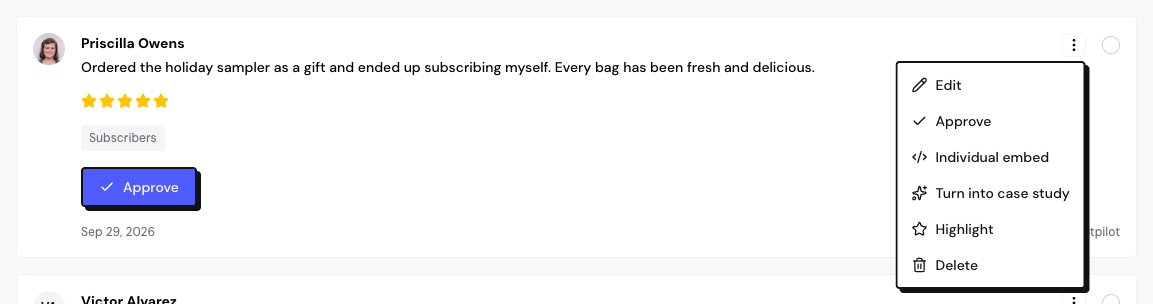
To approve several at once, select the cards and use Approve in the bulk actions bar.
Testimonials over the plan limit
If your account has already reached your plan’s limit of text or video testimonials, new ones keep coming in, but they stay pending with the Over plan limit notice. They can’t be approved until there is room.
- Upgrade with the View plans link, or
- delete other testimonials. The ones over the limit are released from oldest to newest as room frees up.
No testimonial is lost because of the limit. The numbers for each plan are in Plans and limits.
Frequently asked questions
I approved a testimonial and it doesn’t appear on my Wall.
Check the Wall’s or the Widget’s selection: it may filter by tags, rating or type, or show only hand-picked testimonials.
Can I reject or archive a testimonial?
There is no reject or archive. Leave the testimonial pending to keep it unpublished, or delete it if you don’t want to keep it.
How do I approve automatically?
Turn on Approve testimonials in the form settings. That form’s testimonials arrive already approved.