Form settings
The settings control how the form works: the public link, approval, automatic tags and whether it is receiving responses.
Open the settings
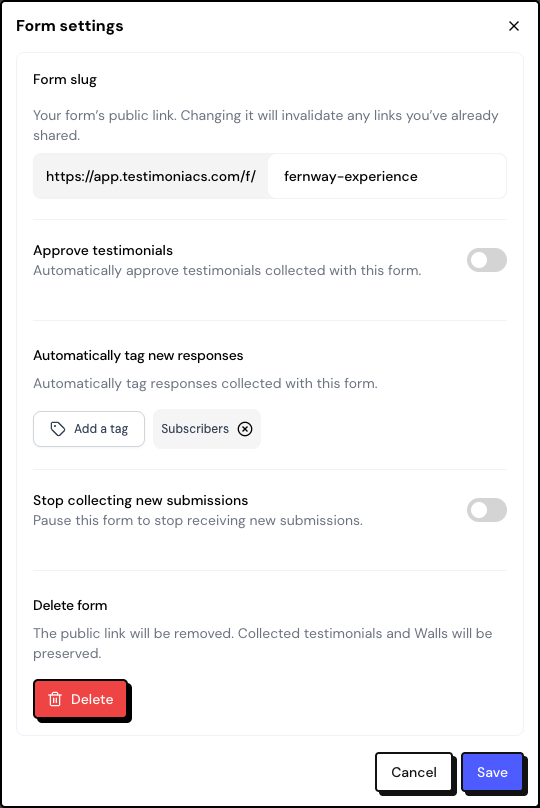
What you can configure
| Option | What it does |
|---|---|
| Form slug | The end of the public link. Use lowercase letters, numbers and hyphens, up to 60 characters. |
| Approve testimonials | Automatically approves this form’s testimonials. Only exists on testimonial forms and is off by default. |
| Automatically tag new responses | Adds the chosen tags to every new response to this form. |
| Stop collecting new submissions | Pauses the form. Anyone who opens the link sees This form is paused. |
| Delete form | Removes the form and the public link. |
Changing the slug invalidates the links you already shared, including printed QR codes. Only change it if you need to.
Automatic approval
With Approve testimonials off, each new testimonial arrives in the Inbox as pending and only appears on Walls and Widgets after you approve it. With the option on, it arrives already approved.
Turn on automatic approval only on forms you have good control over, such as a link sent to customers you know.
Pause and delete
Pause
Turn on Stop collecting new submissions and save. The form’s card then shows Collection paused, and the link shows that it isn’t receiving responses. To start collecting again, turn the option off.
Language and notifications
- Public form language: it’s your account’s language, set in Settings › Profile. There’s no per-form language, and the form doesn’t change based on the visitor’s language.
- Notifications: the alerts for a new testimonial, an NPS response and an NPS detractor belong to your account, in Settings › Notifications, and apply to all forms.
Frequently asked questions
”This form slug is already in use” appears.
Another form already uses that slug. Choose a different one, for example with the product name.
Do automatic tags apply to older responses?
No. They’re only added to responses that arrive after you save.
I want the form in another language for customers abroad. How do I do that?
The system’s buttons and messages follow your account’s language. The texts you write (titles, questions, subtitles) can be in any language, so you can write an entire form in another language.