Share a testimonial
Besides Walls and Widgets, each approved testimonial can be shared on its own: through a public link or embedded in a page of your website.
Only approved or highlighted testimonials can be seen in public. Approve the testimonial before sharing it.
Public link or embed?
Copy the public link
Open the menu
In the Inbox, click the ⋮ menu of an approved testimonial.
Copy the link
Click Copy public link. The message Public link copied appears.
The link has the format /t/…. If the space has a custom domain, the link uses that domain. The page doesn’t appear in Google search results.
Embed on your website
Open the code
In the testimonial’s ⋮ menu, click the embed option (iFrame).
Check and copy
Use Open preview to see how it looks and click Copy.
Paste it on your website
Paste the code into the page’s HTML, where the testimonial should appear. Adjust the height if needed.
<iframe src="https://app.testimoniacs.com/embed/single/TESTIMONIAL_ID" width="100%" height="400" frameborder="0"></iframe>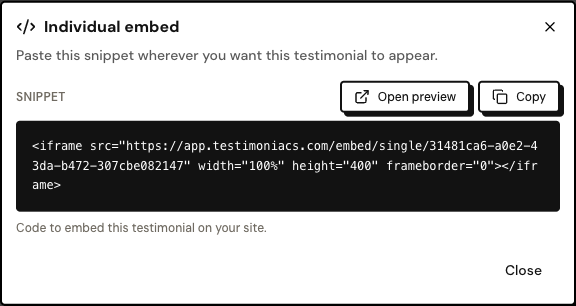
Frequently asked questions
I unapproved a testimonial. Do the link and the code still work?
No. The testimonial stops appearing on the public link and in the embedded code until it is approved again.
I want to show several testimonials together.
Use a Wall (a page with several testimonials) or a Widget for your website.
Can I download the testimonial as an image?
Not at the moment. Share the public link or embed the testimonial.