Custom domain
With a custom domain, the space’s public pages open at your own address, such as testimonials.yourcompany.com, instead of app.testimoniacs.com.
Available on the paid plans, for Admins and the Owner. One domain per space.
Set it up
Add the subdomain
In Settings › Domain, fill in Subdomain and click Add domain. Use a subdomain, such as testimonials.yourcompany.com. Root domains (yourcompany.com) aren’t accepted.
Create the DNS records
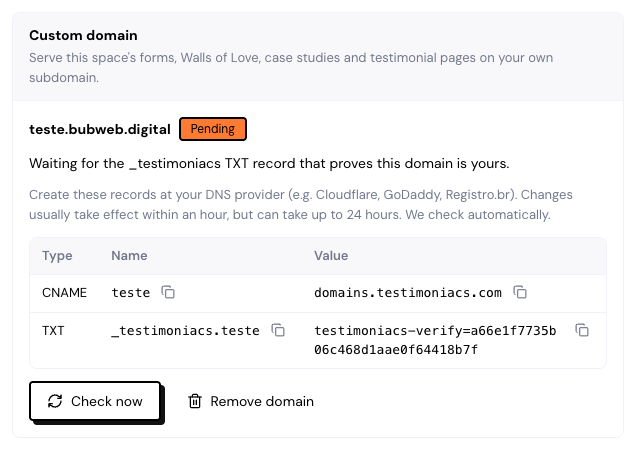
In your domain’s dashboard (Cloudflare, GoDaddy, Registro.br…), create the records in the table. Use the copy button on each row:
- A CNAME for the subdomain pointing to
domains.testimoniacs.com. - A TXT
_testimoniacsrecord, which proves the domain is yours. - Sometimes, an extra verification TXT record.
Wait for verification
DNS usually takes effect within 1 hour, but it can take up to 24 hours. The screen checks on its own; use Check now if you like. Once everything is right, the HTTPS certificate is issued and the domain becomes Active.
Domain statuses
| Status | What it means |
|---|---|
| Pending | Waiting for a DNS record or the HTTPS certificate. The screen tells you which. |
| Active | Live. The Owner and Admins get the “Custom domain is live” notification. |
| Needs attention | Verification expired or something changed in the DNS. Check the records. |
| Suspended | Paused because the plan no longer includes a custom domain. |
Without DNS within 7 days, verification stops. If it isn’t activated within 14 days, the domain is released and has to be added again.
Once the domain is active, you can delete the TXT record.
What opens on your domain
- Forms, campaign invitations and testimonial pages.
- Walls and case studies.
- The main address (
testimonials.yourcompany.com) opens the most recently updated published Wall.
Old links on app.testimoniacs.com keep working. Share buttons and emails start using your domain. Embedded Widgets always load from app.testimoniacs.com.
Change, remove or switch plans
- To change it, click Remove domain and add the new one. Links on the old domain stop working right away.
- If your plan no longer includes a custom domain, it becomes Suspended and visitors go to the same address on
app.testimoniacs.com. If you go back to a paid plan within 30 days, the domain comes back. After that, it’s removed.
Frequently asked questions
Can I use the root domain, without a subdomain?
No. Use a subdomain, such as testimonials or customers.
I did everything and it’s still Pending.
Check that the records’ Name was pasted the way the table shows it and that there is no other record for the same subdomain. The screen shows which record is still missing.
Can each space have a domain?
Yes. Each space has its own, set up in its Domain tab.