Generate a case study with AI
A case study is a customer story with a challenge, a solution and results. The AI writes it from a testimonial, and you edit whatever you want before sharing it.
AI case studies have a monthly quota per account, depending on your plan. The quota renews every month.
Where to start
From the Inbox
On the testimonial, open the ⋮ menu and click Turn into case study.
Generate
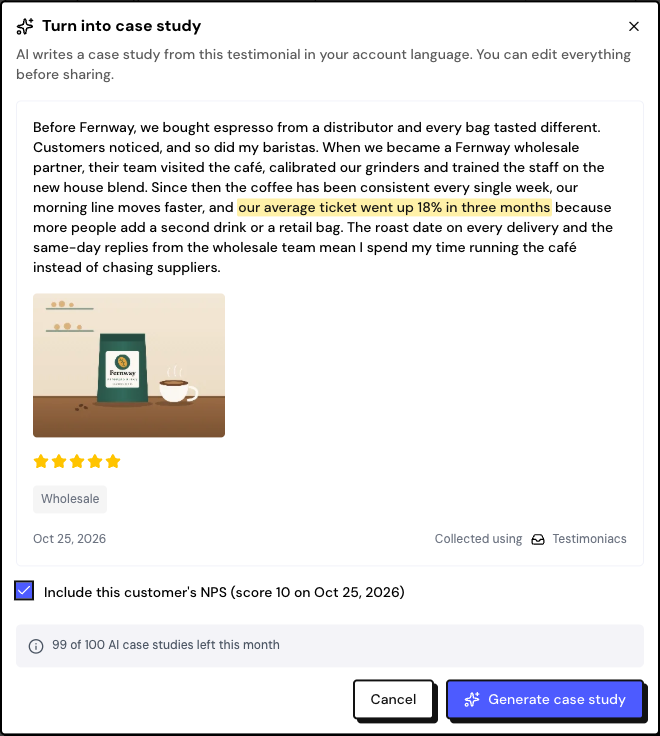
Check the testimonial
The window shows how many case studies you have left this month. If the testimonial is short, the case study comes out short too.
Include the NPS, if you want
If the person gave a score of 9 or 10 in an NPS survey, check Include this customer’s NPS to bring the score into the story.
Generate it
Click Generate case study. It takes about 20 seconds. The editor opens with the text ready.
What the AI writes
- The text comes out in your account’s language. The customer’s quote stays in the original language.
- The story uses only what is in the testimonial and the NPS. Review numbers and names before publishing.
- Each testimonial can have one case study. To generate it again, delete the current one.
A video testimonial needs text. Run an analysis in Insights first to generate the video’s transcript.
Frequently asked questions
The generation failed. Did I lose quota?
No. If the generation fails, no quota is used. Try again.
I used up the month’s quota.
Wait for it to renew next month or upgrade in Settings › Billing.
Where do I see the case studies I’ve already created?
In the person’s profile, under Case studies, or with View case study on the testimonial, in the Inbox.