Import testimonials from a spreadsheet or export
If you already have testimonials in another tool or in a spreadsheet, you don’t need to ask for them again. In Import, you upload the file, say which column is which and review before importing.
Where to import
- In the sidebar, under Collect, click Import.
- In the Inbox, use the Import button, next to Add testimonial.
- The end of the guided setup and the Overview checklist also have a shortcut to import.
Importing requires the Editor, Admin or Owner role in the space.
Accepted files
| Format | Limits |
|---|---|
| CSV, TSV, XLSX, XLS, JSON | Up to 5,000 rows, 100 columns and 10 MB. |
| ZIP | Up to 25 MB. The app uses the JSON files with lists of records or the first CSV inside. |
| PDF, DOCX, TXT, HTML and screenshots | Read with AI, on the Pro and Business plans. See Import testimonials from documents and screenshots with AI. |
Upload one file at a time. Exports from Senja, Testimonial.to, Google Takeout (Google reviews) and Trustpilot are recognized by their column names, as are your own spreadsheets.
Not sure how to set up the spreadsheet? On the upload screen, click Download example CSV and use it as a template.
Upload and map the columns
Upload the file
Drag the file to the Drop a file here area or click Choose file.
Check the sheet or the records
In a spreadsheet with several sheets, choose the right one in Sheet. In a JSON file with several lists, choose in Records.
Map the columns
For each Testimoniacs field, choose the file column that fills it, or Do not import. Columns that aren’t mapped are left out.
Adjust the rating and date
In Rating scale, say whether the rating goes from 1 to 5 stars, from 0 to 10 or from 0 to 100%. In Date format, leave Detect automatically or choose the format.
Review the rows
Click Review rows. To continue, map at least the testimonial text or the video URL.
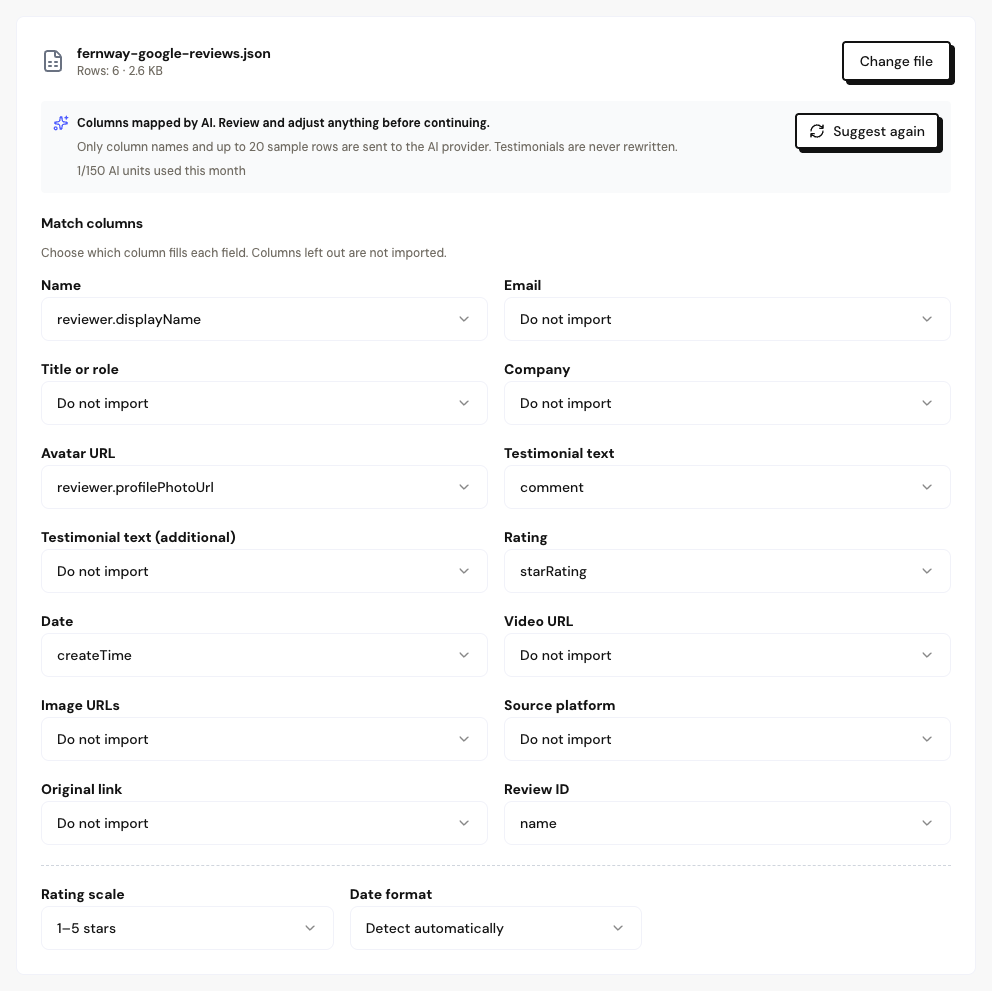
Available fields
Name, Email, Title or role, Company, Avatar URL, Testimonial text, Rating, Date, Video URL, Image URLs, Source platform, Original link and Review ID.
- Testimonial text accepts up to 6 columns, which become paragraphs, for example a title and a comment.
- Image URLs accepts up to 3 columns. If a cell has several links, set the Image separator.
On the Pro and Business plans, AI suggests the column mapping on its own, and you just review it. On the Free plan, columns are matched by name and you adjust them by hand.
Frequently asked questions
Can I import straight from Google or Trustpilot, without a file?
No. Importing always uses a file. Export the data from the tool (for Google, through Google Takeout) and upload the file here.
My spreadsheet has more than 5,000 rows.
Split it into files of up to 5,000 rows and import them one at a time. Rows repeated across files are detected as duplicates.
Accented characters came out wrong.
Save the CSV as UTF-8 and upload it again. The app also tries to read files from older versions of Excel, but UTF-8 is the safest.