Add or edit a testimonial
Got praise by email, WhatsApp or in a conversation? Add it straight to the Inbox. To bring in many at once, use Import.
Add a testimonial
Open the form
In the Inbox, click + Add Testimonial.
Choose the type
Under Collection type, choose Text or Video. The type can’t be changed later.
Enter the customer
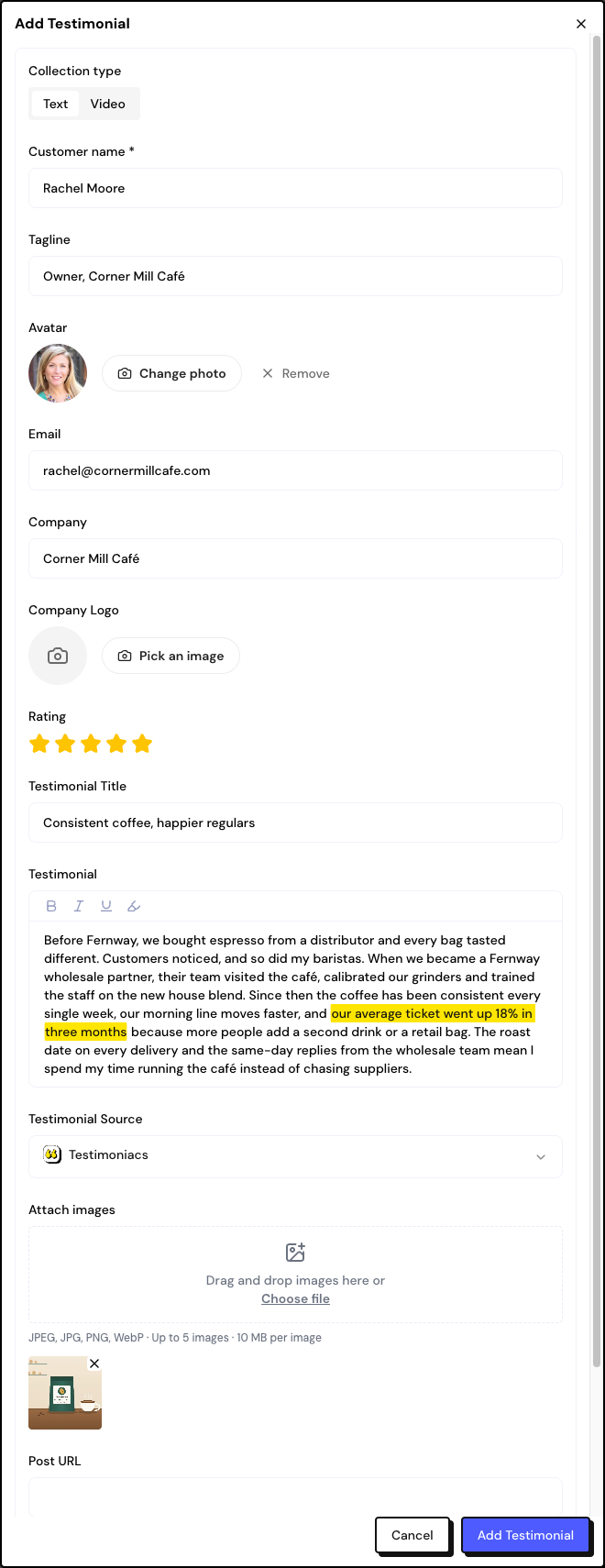
In Customer name, start typing. If the person already exists, pick them from the list. If not, type the name and fill in the tagline, avatar, email, company and logo: the person is created when you save.
Fill in the testimonial
See each type’s fields below. The Date is required and starts as today.
Save
Click the save button at the bottom of the window. The testimonial comes in as Pending.
Text
- Rating: 1 to 5 stars, optional.
- Testimonial Title and Testimonial (required). The editor has bold, italic, underline and Highlight text, which marks a passage that appears emphasized on Walls.
- Attach images: up to 5, up to 10 MB each (JPEG, PNG or WebP).
- Post URL: the link to the original post, if there is one.
Edit a testimonial or an NPS response
In the card’s ⋮ menu, click Edit. The window is the same one used for adding, with a few differences:
- The type can’t be changed. On a video testimonial, you can replace the file.
- You can change the text, title, excerpt, rating, date, images, link, tags and the linked person.
- On an NPS response, you edit the score (0 to 10) and each answer.
The person’s details (name, email, company) are edited in People, not in the Inbox.
Frequently asked questions
Can I change the source to Google or LinkedIn?
When you add a testimonial by hand, the source is always Testimoniacs. To keep the source platform, import the testimonial with the Source platform or Source label field.
I can’t upload the video.
Check the format and size (up to 1,000 MB). If you see the plan’s video limit notice, upgrade or delete a video.
Does changing the date change the position in the Inbox?
Yes. The Inbox sorts by testimonial date, newest first.