Import testimonials from documents and screenshots with AI
On the Pro and Business plans, AI helps you import testimonials that aren’t in a spreadsheet, such as a PDF with reviews, a Word document or social media screenshots. It also suggests the column mapping of a spreadsheet on its own.
Available on the Pro and Business plans. Each plan has a number of AI units per month; see Plans and limits. On the Free plan, you import spreadsheets and map the columns manually.
Files read with AI
| Format | Limits |
|---|---|
| Up to 20 MB. Only the first 50 pages are read. | |
| DOCX | Up to 10 MB. |
| TXT, Markdown and HTML | Up to 2 MB. |
| Screenshots (PNG, JPG, WebP) | Up to 10 MB each and up to 10 screenshots per import. |
Find testimonials in a document
Upload the file
In Import, upload the document or select up to 10 screenshots at once.
Check the units
The app shows how many AI units reading the file will use and how many you have left this month.
Click Find testimonials
AI reads the file in parts and shows the progress. Then you go to the review.
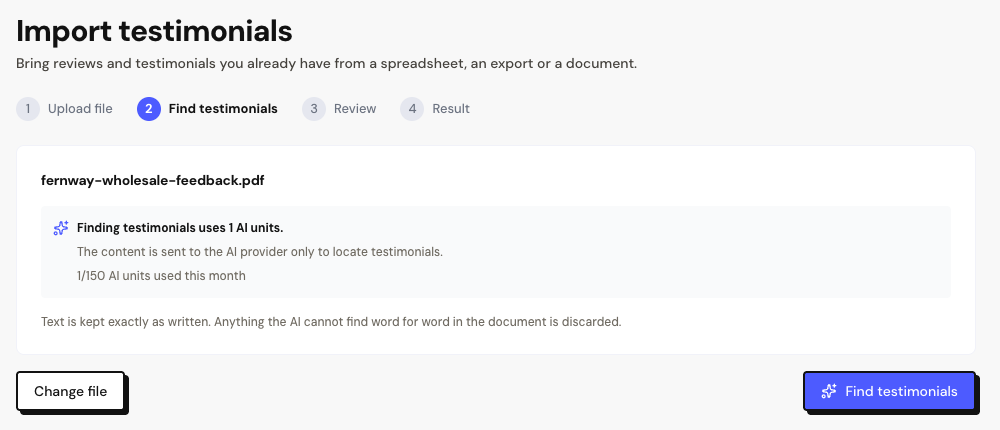
What AI does and doesn’t do
Testimonials read from screenshots show the Check text warning. Read each one during the review before importing.
How AI units are counted
| Action | Units |
|---|---|
| Map the columns of a spreadsheet | 1 per spreadsheet. Runs on its own when you load the file or switch sheets. Suggest again uses 1 more. |
| Read a document | 1 per part of the text, up to 10 parts. Very long documents only have the first part read. |
| Read screenshots | 1 per image. |
Units belong to your account, adding up all spaces, and renew at the start of each month. If reading fails at no cost, the unit is returned.
Frequently asked questions
What is sent to AI?
When mapping columns, only the column names and up to 20 sample rows. When reading documents and screenshots, the file’s content, only to locate the testimonials.
I ran out of units. What now?
Spreadsheets keep working: map the columns manually. Documents and screenshots can only be read when your units renew next month or after you change plans.
Some excerpts were discarded.
AI only accepts text that exists exactly as is in the file. Excerpts that don’t match are discarded so no testimonials are made up. If something is missing, crop the screenshot or upload the excerpt in a TXT file.