NPS form analytics
Each NPS form has an analysis page with the survey results: the NPS, the average score, the distribution and how many people left a comment.
Open the analysis
Open Forms
In the sidebar, click Forms and choose the NPS tab.
Click Analysis
On the survey’s card, click Analysis.
Choose the period
At the top of the page, choose All time, Last 7 days, Last 30 days or Last 90 days.
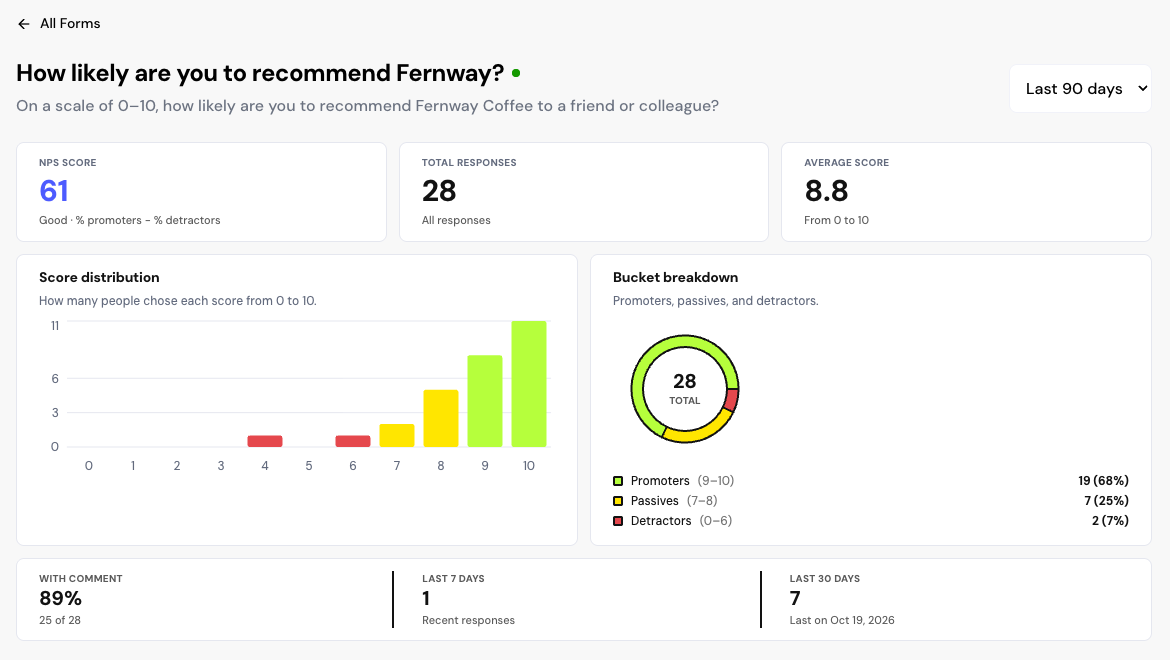
What each metric shows
| Metric | What it shows |
|---|---|
| NPS Score | % of promoters minus % of detractors, from −100 to 100. With few responses, the Small sample warning appears. |
| Total responses | How many people responded in the period. |
| Average score | The average of the scores, from 0 to 10. |
| Score distribution | How many responses each score received. |
| Bucket breakdown | Promoters, passives and detractors. |
| With comment | How many responses include text in the questions. |
| Last 7 days and Last 30 days | Recent responses and the date of the latest one. |
To read the comments and see who responded, open the responses in the Inbox. To compare periods and see the most mentioned topics, use Insights.
Frequently asked questions
Do testimonial forms have an analysis page?
No. The form’s card shows the number of responses, approved testimonials and videos. For visit and completion metrics per form, use Insights.
I deleted the NPS form. Are the results kept?
No. When you delete an NPS form, the responses and metrics are removed. If you want to stop collecting and keep the results, pause the form.
Why does “Small sample” appear?
With few responses, the NPS changes a lot with each new score. Wait for more responses before drawing conclusions.