Contact permission
Contact permission says whether a person can receive email invitations from your campaigns. It’s separate from the authorization to publish the testimonial, which the customer gives in the form.
The four states
| State | What it means |
|---|---|
| Unknown | There’s no permission record. This is the default for new people, including those created by forms and testimonial imports. |
| Authorized | The person authorized receiving invitations. It’s the only state that receives campaigns. |
| Unsubscribed | The person asked to stop receiving invitations. |
| Blocked | The email shouldn’t receive invitations, for example after bouncing or generating a complaint. |
Authorize when adding
In + Add person, check This person authorized invitations and fill in the Permission record: when and how the person authorized contact. The person must have an email.
Change the permission later
Open the profile
In People, open the person. In the Contact permission section, click the pencil (Update contact permission).
Choose the new state
In Status to record, choose the state.
Write the reason
In Reason for this change, describe why. For Authorized, include when and where the authorization came from.
Record it
Click Record change.
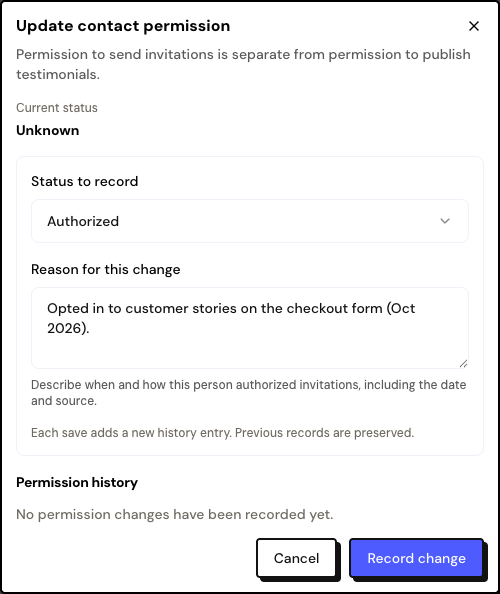
Permission history
Each change is kept in the profile’s Permission history, with the state, the date, the reason and the source: Manual record, CSV import or Email address changed. Earlier records are never erased.
Only record Authorized when the person really agreed. The history serves as proof of the authorization.
Frequently asked questions
How do I authorize many people at once?
Import the contacts from a CSV with the permission confirmation. See Import people from a CSV.
I changed the email and the person dropped out of the campaign.
Changing the email of an Authorized person sets the permission back to Unknown. Record the authorization again.
Why did the person become Unsubscribed on their own?
They clicked Unsubscribe from invitations in a campaign email.