Team: invite and change roles
In Settings › Team, you invite people to work in the space and decide what each of them can do.
Inviting people is on the paid plans, with a number of seats that depends on the plan. Only Admins and the Owner see the Team tab.
Roles
| Role | What they can do |
|---|---|
| Owner | Everything, including the subscription and deleting the space. |
| Admin | Invites and removes people and edits everything, except the subscription and deleting the space. |
| Editor | Creates and edits content: Inbox, forms, Walls, Widgets, people, campaigns and Insights. |
| Sharer | Views and shares forms, Walls and Widgets. |
Invite
Fill in the invitation
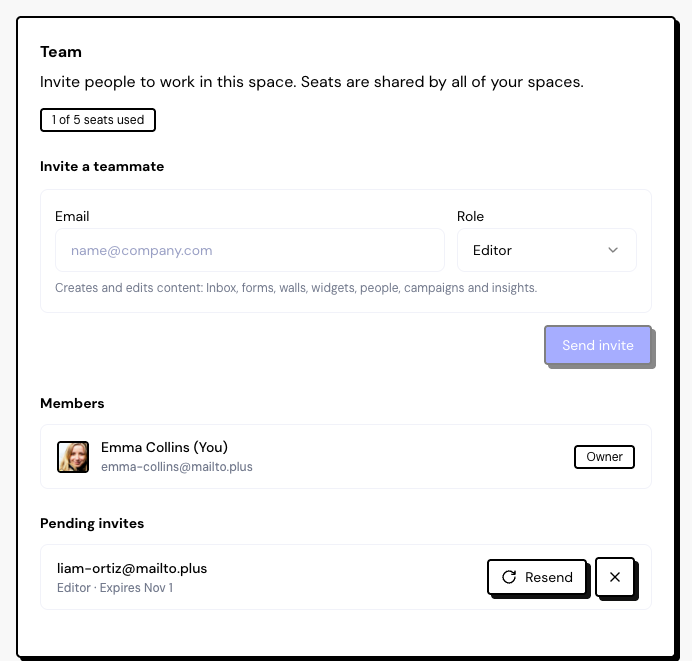
In Invite a teammate, type the Email, choose the Role (the default is Editor) and click Send invite.
The person accepts
They get an email and click Accept invite. They need to sign in or create their account with the same email address the invitation was sent to.
Done
The space appears for them under Shared with me, and the Owner and Admins get a notification.
Invitations expire after 7 days. Use Resend to send it again and renew the deadline, or Cancel invite.
How seats count
- The Owner doesn’t take a seat.
- Seats apply across all of the Owner’s spaces: the same person in several spaces counts once.
- Pending invitations also take a seat until they expire or are canceled.
If the team goes over the plan’s limit, for example when you move to a smaller plan, all members lose access to the Owner’s spaces until you remove people or upgrade.
Change roles, remove and leave
- In the Members list, choose another role or use the trash icon to remove someone. Anyone removed loses access right away.
- No one can change their own role. The Owner role doesn’t change: there is no way to transfer ownership of the space.
- To leave someone else’s space, open the space switcher at the top of the sidebar and use Leave space.
Frequently asked questions
The person says the invitation doesn’t work.
They need to sign in with the same email the invitation went to. If they signed in with another one, the screen offers Use another account. If more than 7 days have passed, resend it.
Does the member need to pay for a plan?
No. In the Owner’s spaces, the limits of the Owner’s plan apply.
A member sees “Access paused”.
The Owner’s team went over the seat limit or the Owner’s account is inactive. The Owner needs to remove people or upgrade.