Campaign automations
With an automation, the campaign doesn’t go out all at once: each invitation is sent when an event happens with a customer. For example, asking for a testimonial from someone who just gave a 10 on the NPS.
The available recipes
| Recipe | When the invitation is prepared |
|---|---|
| Ask promoters for a testimonial | When someone gives a 9 or 10 on an NPS form. |
| Invite after receiving a testimonial | When a testimonial arrives on a testimonial form. |
| Invite after approving a testimonial | When a testimonial is approved for the first time. |
| Invite when someone joins a segment | When a person becomes part of a saved segment. The check runs every five minutes. |
Set up an automation
Prepare the draft
Create a campaign with One-time and After confirmation in Review, with no scheduled date, and save the draft.
Open the automation
In the Automation panel, in the Configuration step or in the Review, click Configure automation.
Choose the recipe
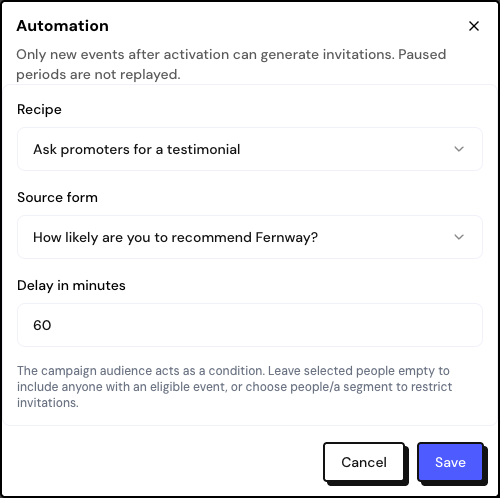
Under Recipe, choose the event. Under Source form, choose a specific form or All compatible forms. For the segment recipe, choose the Entry segment.
Set the delay
Under Delay in minutes, say how long to wait after the event. The default is 60 minutes, and the maximum is 30 days.
Activate
In the Review, click Activate automation and confirm.
Important rules
- New events only: the automation doesn’t invite people who did something before it was activated. Periods when the campaign was paused aren’t made up for either.
- The audience works as a filter: if you chose people or a segment in the audience, only they can be invited. Leave the selection empty to apply it to anyone with the event.
- The sending rules still apply: authorized contact permission, the 30-day interval and the monthly email quota.
- In the promoters recipe, people who already answered the chosen testimonial form don’t receive the invitation.
Frequently asked questions
How is this different from the NPS form’s promoter invitation?
The invitation on the form appears right away, on the thank-you page. The automation sends an email after the chosen delay, and only to people with authorized contact permission.
Can I combine an automation with scheduling?
No. The automation requires a one-time send with no scheduled date.
How do I stop an automation?
Open the campaign and click Pause, or archive it to end it for good.